Everyday Technology Workflows · Cross-Device Essentials
Set up a work or school account safely
Beginner · 10–15 minutes with practice · Windows macOS iPhone iPad Android
Read It
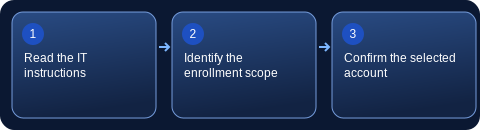
- Read the IT instructions. Windows 11: Settings → Accounts → Access work or school → Connect only when IT requests device connection. When the sign-in dialog offers app-only sign-in, choose it for app-only use unless IT requires enrollment.
- Identify the enrollment scope. On macOS, iOS and iPadOS, use the organization’s official app or setup workflow. Install a configuration profile only if your IT team identifies it and confirms what it manages.
- Confirm the selected account. On Android use your organization’s setup instructions for a work profile if required. A work-profile app and its personal copy can use separate accounts and storage.
Practice It
Read the consent screen and identify the displayed organization, account, and any device management language before proceeding.
Common mistakes and safe recovery
Removing a work account or profile can remove work mail, apps and local work data. Ask IT before disconnecting or changing policy.
Official references
Related lessons
- Technology Essentials 11: Understand user accounts, guest access and sign-out options.
- Technology Essentials 39: Manage multiple profiles or accounts within apps and browsers.
- Technology Essentials 61: Set up an email account across desktop and mobile apps.
- Use a Chrome Guest window on a shared computer
- Review devices signed in to your Google Account