Workplace Technology Academy · Security and Remote Work
Recognize and report workplace phishing
Beginner · 10–20 minutes including practice
Read It
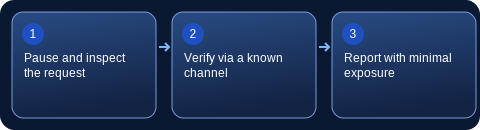
- Pause and inspect the request. Do not open an unexpected attachment, follow a sign-in link or approve an unexpected MFA prompt. Check the actual sender and the nature of the request. Familiar branding alone is insufficient.
- Verify via a known channel. Use a known phone number, bookmark or internal directory to verify a payment or credential request. Follow your organization’s reporting process or approved report button.
- Report with minimal exposure. If you already clicked, entered credentials or approved a prompt, tell your security team promptly using a known channel. Preserve the message as policy directs and avoid forwarding it widely.
Practice It
Review a fictional request to change a supplier’s bank details. Identify three warning signs and choose a safe verification path.
Common mistakes and troubleshooting
Do not reply to the suspicious message for verification. Do not send sensitive evidence or files outside approved channels.
Official references
Related lessons and assistance
- Technology Essentials 46: Identify official websites, advertisements and lookalike domains.
- Technology Essentials 51: Check connection security before entering personal details, while explaining the limitations of HTTPS.
- Technology Essentials 68: Recognize spam, scams and phishing emails.
- Technology Essentials 94: Recognize fake technical support pop-ups, prize alerts and urgent payment scams.
- Protect yourself from phishing and online scams
- What should I do about a suspicious tech support pop-up?
- Review app permissions, notifications and privacy