Workplace Technology Academy · Security and Remote Work
Enroll workplace MFA and passkeys safely
Beginner · 10–20 minutes including practice
Read It
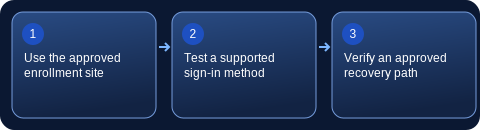
- Use the approved enrollment site. Follow your IT department’s known enrollment route. Use the organization’s supported authenticator, security key or passkey. Keep an approved existing method available while setting up the new one.
- Test a supported sign-in method. When allowed, use the approved platform or credential provider to save a passkey. Windows, macOS and mobile options differ by OS and policy. Check the correct work account before confirming.
- Verify an approved recovery path. Test sign-in in an authorized test session and verify how to recover access if the device is unavailable. Handle recovery codes according to policy.
Practice It
With a fictional account, explain how you would confirm enrollment and recover access without revealing a password, passkey or code.
Common mistakes and troubleshooting
Deny unexpected approval prompts and contact your known support channel. Do not remove an older factor before testing the approved replacement.
Official references
Related lessons and assistance
- Technology Essentials 91: Create strong, unique passwords for every account.
- Technology Essentials 92: Use password managers to generate and store passwords.
- Technology Essentials 93: Enable two-factor or multi-factor authentication.
- Technology Essentials 95: Lock devices using strong passcodes, PINs or biometric authentication.
- Technology Essentials 97: Review app permissions for location, contacts, photos and other data.
- Turn on Google Account 2-Step Verification
- Check whether a device is suitable for a Google passkey
- Store Google backup codes for account recovery
- Set up a password manager, MFA and passkeys
- Set up a work or school account safely