Everyday Technology Workflows · Windows and macOS
Set up desktop email, send an invite and check call permissions
Beginner · 10–15 minutes with practice · Windows macOS
Read It
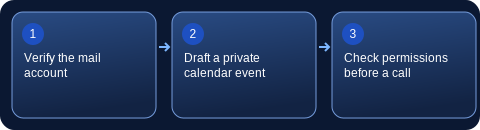
- Verify the mail account. In Outlook on Windows 11, add the account through Outlook’s account settings, using your provider’s official sign-in. In Apple Mail on macOS, use Mail → Add Account. Verify the selected sender address.
- Draft a private calendar event. Open the calendar for that account. Draft an event with a title, time zone and location. Add guests only when ready to send an invitation.
- Check permissions before a call. In Windows Privacy & security or Mac Privacy & Security, check microphone and camera access. For browser meetings, also check site permissions and the meeting app’s device selection.
Practice It
Draft a fictional private event and run the video app’s preview without sending an invite or joining a real meeting.
Common mistakes and safe recovery
Removing an account can remove its cached mail or calendar from the device; verify any local-only drafts first. Check profile and mute indicators if hardware is missing.
Official references
Related lessons
- Technology Essentials 61: Set up an email account across desktop and mobile apps.
- Technology Essentials 64: Attach files and check file size limits before sending.
- Technology Essentials 72: Create and update calendar events, locations and invitations.
- Technology Essentials 73: Set calendar alerts, recurring events and reminders.
- Technology Essentials 74: Join Zoom, Teams, Google Meet and FaceTime meetings.
- Technology Essentials 75: Mute and unmute microphones and enable or disable cameras.
- Technology Essentials 76: Test microphones, speakers and cameras before important calls.
- Technology Essentials 77: Share screens, windows or browser tabs during video calls.
- Send an attachment in Outlook
- Find Gmail messages that have attachments