Workplace Technology Academy · Documents and Cloud Files
Manage an Outlook inbox, calendar and follow-up
Beginner · 10–20 minutes including practice
Read It
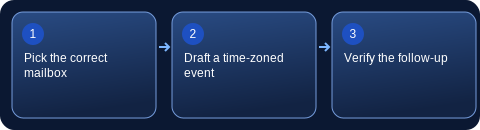
- Pick the correct mailbox. Use new Outlook, classic Outlook or Outlook on the web as approved. Select the work mailbox, search by sender or subject, and flag a practice thread for follow-up.
- Draft a time-zoned event. Open Calendar and choose the intended calendar. Add a title, time zone, agenda and attendees. Check who should be required or optional before sending. Draft an event without guests for practice.
- Verify the follow-up. After the mock meeting, write a short recap that lists decisions, owners and deadlines. Verify recipients before Reply All and send a restricted link only if the audience needs it.
Practice It
Draft a 20-minute plan review for fictional Harbor Desk, with a two-item agenda and a clear action owner.
Common mistakes and troubleshooting
An event has no invitees until you add them. Changing an existing meeting may notify attendees. Review the calendar and time zone before editing a recurring series.
Official references
Related lessons and assistance
- Technology Essentials 61: Set up an email account across desktop and mobile apps.
- Technology Essentials 62: Write clear emails with focused subjects, greetings and sign-offs.
- Technology Essentials 63: Use To, Cc and Bcc properly.
- Technology Essentials 64: Attach files and check file size limits before sending.
- Technology Essentials 65: Use Reply and Reply All appropriately.
- Technology Essentials 66: Search, archive, star, flag and filter messages.
- Technology Essentials 67: Schedule emails and undo sending within supported grace periods.
- Technology Essentials 72: Create and update calendar events, locations and invitations.
- Send an attachment in Outlook
- How do I schedule an email in Gmail?
- Set up desktop email, send an invite and check call permissions